
2.3 KiB
setting a router param
{ path: '/event/:id', name: 'eventSingle', component: () => import ('../views/EventSingle.vue') }
reading a router param
created() { const ID = Number(this.$route.params.id); const event = this.events.find(event => event.id === ID); this.event = event; }
create something from this router param (Using it)
see above
find in a dict and the syntax of => ===
Use find as a method on an array.
find(something => something.id === ID)
use arrow notation here in order to use the param you define to be used. the bit before the arrow notation is a param you want to find (name is arbitrary it will resolve to an object) the bit after the arrow allows you to use the name you want to be iterated/used. this must resolve to a boolean (i.e === as a coniditional) think of the arrow notation as a "where" clause (find something where something===True/False)
setting a param based off this
in a hook you can set the value of your find and bind it to something this.event = event;
make sure to create it in data too
using class bindings (setting a class of an element dynamically) link to https://vuejs.org/v2/guide/class-and-style.html
v-binds (v-bind: and just :)
using v-for, what it does (renders the thing being v-for'd for each thing in it) how to set an html attribute from this (using v-bind:attribute e.g v-bind:src)
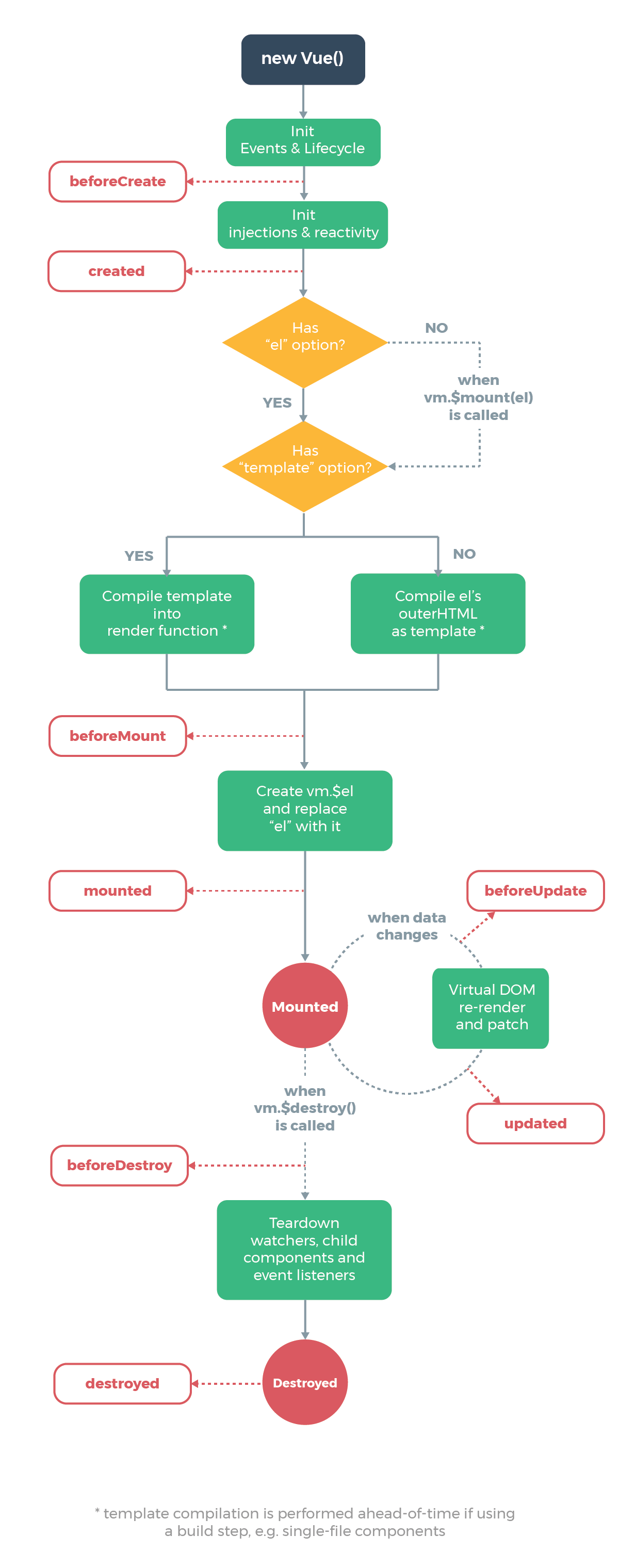
Vue lifecycle (useful for seeing all hooks available) https://cdn.auth0.com/blog/vue-meetup/vue-lifecycle.png
doing something on a click
in a <a> you can use @click="login" to do a method
You should define this method in the script directive
Conditional (ternary) operator https://developer.mozilla.org/en-US/docs/Web/JavaScript/Reference/Operators/Conditional_Operator
The "?" and ":" syntax is often used as a shortcut to a if block When using this you should specify 3 arguments:
- the condition to check
- what should happen if it's true (?)
- what should happen if it's false (:)
onRedirectCallback: appState => { router.push( appState && appState.targetUrl ? appState.targetUrl : window.location.pathname ); }